Microsoft Power Platform

Enterprise Integration

Integrate Applications across your organization through your existing Microsoft 365 account

Microsoft Dataverse

Data Integration

Manage your data securely with Dataverse and connect to data across your enterprise

Model Driven Power Apps

Low-code Development

Customize your apps in minutes using Power Apps, with zero coding required. Empower your team now!

Power Automate your Workflow

Seamless Integration

Unlock efficiency with Power Automate and streamline your business processes effortlessly. Create custom Approval Workflows to ensure compliance across all of your programs.

Copilot AI

AI-Powered Tools

Enhance your applications with Copilot AI Studio for smarter workflows and improved productivity.

Data-Driven
Insights

Leverage Data

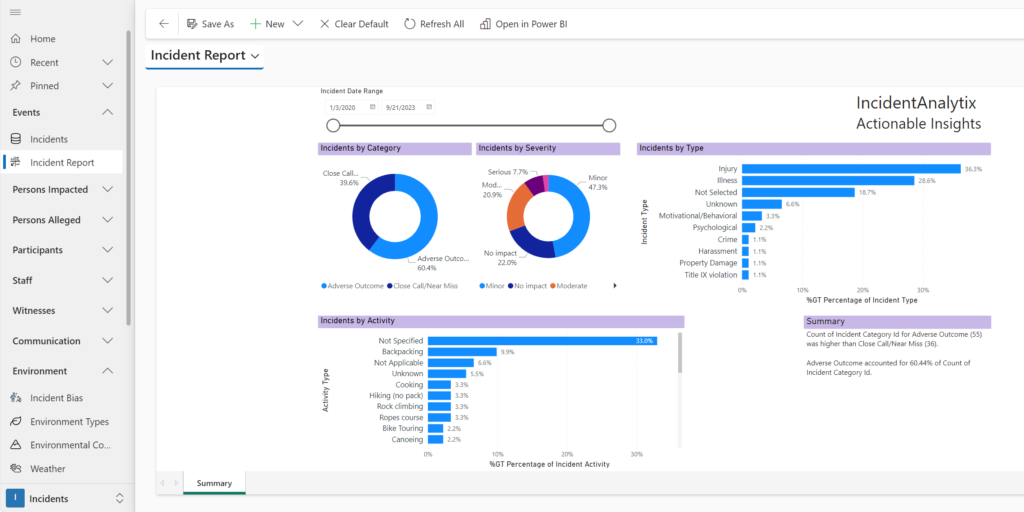
Utilize Power BI to transform your data into actionable insights and make informed decisions.

IncidentAnalytix Power BI Report

Microsoft
Power Pages

Data-driven Websites

Enhance SystemsAnalytix applications with secure low-code websites to expand your reach.

Powered by Microsoft’s Low-Code Power Platform for Enterprise-Grade Security & Flexibility

Our solutions are built on the Microsoft Power Platform, which means they run on the same reliable, secure architecture as Microsoft’s own apps. Why does that matter to you? Because it gives you the best of both worlds: tailored functionality for your needs, with the trust, security, and integration of Microsoft’s enterprise ecosystem. Here’s what that entails:
 
  • Power Apps (Custom Interfaces): We use Power Apps to create the user-friendly forms and screens you interact with. This low-code approach means our apps are easily configurable – and your IT or even power users can extend or tweak the interface without heavy development. Translation: The system is as flexible as a custom solution, but as stable as a Microsoft product. Need a new form or to adjust a workflow? It’s a matter of hours, not months.
  • Dataverse (Secure Data Storage): All data (incident logs, program records, attachments, etc.) is stored in Microsoft Dataverse, the secure cloud database within Microsoft 365. This keeps your information in your own tenant (we can’t stress that enough). Your data stays under your governance – compliant with whatever regulations you follow. Microsoft’s Azure infrastructure handles encryption, backups, and meets standards like SOC 2, ISO 27001, and FedRAMP. Bottom line: whether you’re dealing with confidential HR cases or student records, your data is protected by world-class security and privacy controls.
  • Power Automate (Workflow Engine): The process automation in our solutions is driven by Power Automate. This is the engine that sends out those reminders, routes approvals, and updates statuses behind the scenes. Because it’s Microsoft technology, it’s highly reliable and comes with a huge library of connectors. Practical perk: integrating with other systems is straightforward. Power Automate can talk to your Outlook, Teams, SharePoint, or third-party apps (Salesforce, SAP, etc.), so our system can drop a calendar reminder or post a Teams alert as part of a workflow. It also means less custom coding if you want to extend logic – automations can be configured with the Power Automate visual editor.
  • Power BI (Analytics & Dashboards): Under the hood, our dashboards and reports leverage Power BI. For you, that means rich, interactive visualizations that you can trust. You can drill down into data, create new reports, or even merge incident/program data with other organizational data (if you want to do advanced analysis) because Power BI makes it easy to connect data sources. And since Power BI is a standard tool, your analysts might already know how to use it – empowering them to do more with the data in SystemsAnalytix (like combining incident data with HR data to see correlations, etc.).
  • Microsoft 365 Integration: Being on the Power Platform, our solutions natively integrate with the Microsoft 365 tools your teams use daily. Users sign in with their Microsoft 365 credentials (supporting single sign-on and MFA – your security policies fully apply). You can pull in user profiles from Azure AD (so, for example, assigning tasks to “John Doe” auto-recognizes their email and department). Need to attach a file from OneDrive or SharePoint to a case? It’s seamless. Essentially, adopting our system feels like adding new capabilities to your existing Microsoft environment, not bolting on a random external app.
  • Copilot AI (Intelligence Built-In): Because we are part of the Microsoft ecosystem, we leverage the latest innovations like Microsoft 365 Copilot. As AI features roll out, our solutions gain them too. We have full Copilot Agent capability in our all of our apps – imagine typing a query in natural language like, “Show me all open incidents involving Department X” and the system generating the result for you, or asking,“What missing compliance requirements are delaying Project Alpha?” and getting insights. This continuous improvement model means the system you get today will keep getting smarter tomorrow, thanks to Microsoft’s continued expansion of the Power Platforms. You don’t have to do anything – new AI and features come to you via routine Microsoft platform updates.
 

Why This Matters

  • For IT: Our platform choice means easy management and extensibility. You can use the Power Platform admin center to monitor usage, set governance policies and more. No proprietary skillset needed – your existing Microsoft admins and developers are already equipped.
  • For Compliance & Security Officers: Rest assured, the solution lives within your controlled environment. Audit logs, role-based access, encryption – all the enterprise-grade boxes are checked by default because we built atop Microsoft’s stack. If your organization trusts Microsoft 365 with your emails and files, you can trust SystemsAnalytix.
  • For End Users: Users get a modern, familiar experience. There’s no confusing login or clunky interface from a niche software. The look-and-feel aligns with Office apps (we often hear “it feels like part of Teams/SharePoint”). That means less training needed and higher adoption. People already know how to use the system.
 
Using the Microsoft Power Platform, we combine tailor-made functionality with enterprise-class tech. You get the agility of a custom solution and the stability of Microsoft. It’s a combination that uniquely positions SystemsAnalytix to scale and adapt to whatever your organization needs in the future.
 

SystemsAnalytix brings together the power of the Microsoft Power Platform with our solution architecture expertise in enterprise-level risk management and program compliance systems to create the most comprehensive, customizable, and secure no-code solutions available. Extend your existing Microsoft 365 account with fully customizable applications that can be securely distributed across your entire organization. Using the power of the Microsoft Power Platform, SystemsAnalytix delivers comprehensive web applications for your data collection and analysis needs along with enterprise business data analytics. The Microsoft Power Platform adheres to the highest levels of trust, transparency, standards conformance, and regulatory compliance. It’s your data, secure in your Microsoft 365 Tenant. 

Microsoft Power Apps

Model Driven Power Apps revolutionize the way organizations build and deploy applications. By emphasizing a data-first approach, these apps automatically generate user interfaces, guiding users through your business processes efficiently. Ideal for complex scenarios, they streamline operations, ensuring your data structure drives application logic and presentation, optimizing productivity across your organization.

Microsoft Dataverse

At the heart of Microsoft's Power Platform, Dataverse is a robust, scalable data platform and ecosystem. It simplifies data management across applications and business processes, enabling secure, integrated data storage. With its rich metadata, logic, and validation capabilities, Dataverse ensures that data is consistent, accessible, and secure, facilitating insights and actions that drive business success.

Microsoft Power Automate

Streamlining repetitive tasks and paperless processes, Power Automate boosts efficiency and workflow automation. By connecting to hundreds of data sources and integrating with existing systems, it enables the creation of automated workflows that save time, reduce errors, and enhance productivity, allowing teams to focus on strategic tasks.

Microsoft Power Pages

Power Pages is a secure, low-code platform for building external-facing websites that connect directly to your data in Dataverse. Designed for scalability and ease of use, it empowers organizations to create rich, data-driven portals for customers, partners, and communities. With built-in governance, responsive design tools, and seamless integration with the Power Platform, Power Pages extends your digital reach while maintaining control over data and user access.

Microsoft Power BI

Power BI transforms data into actionable insights. This powerful business analytics tool enables users to visualize data, share discoveries, and collaborate in intuitive ways. With real-time dashboards, rich interactive reports, and AI-driven insights, Power BI empowers organizations to make informed decisions quickly, fostering a data-driven culture.

Microsoft Copilot Studio

Microsoft Copilot Studio for Power Apps is a cutting-edge tool designed to empower users to create powerful applications using natural language. Leveraging the power of AI, it interprets user intent to generate app components, logic, and data models, simplifying app development. This innovative tool democratizes app creation, making it accessible to users of all skill levels, fostering innovation and agility within organizations.

Empower Your Team with Enterprise Low Code Tools
Learn how using SystemsAnalytix applications can provide insights and capabilities that single-point solutions can’t match. Get a glimpse of what a fully customizable AI-powered stack can do for your organization.
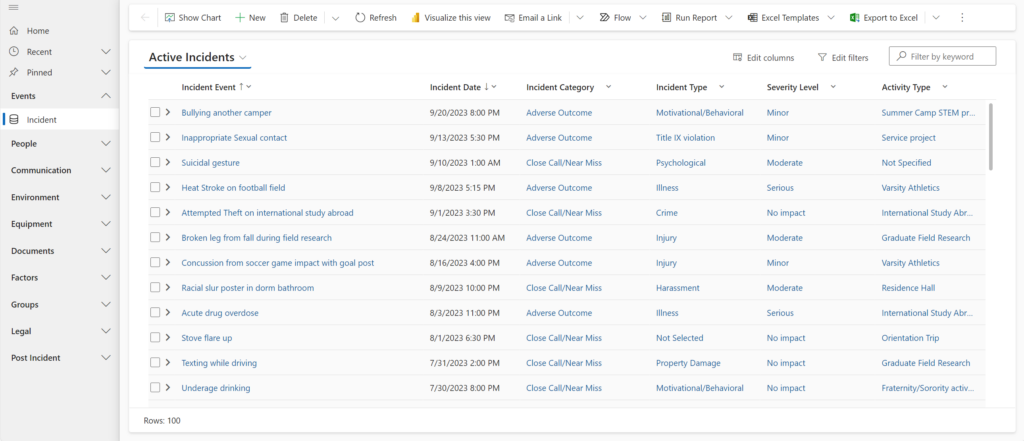
Incident Grid

Rich Data Collection

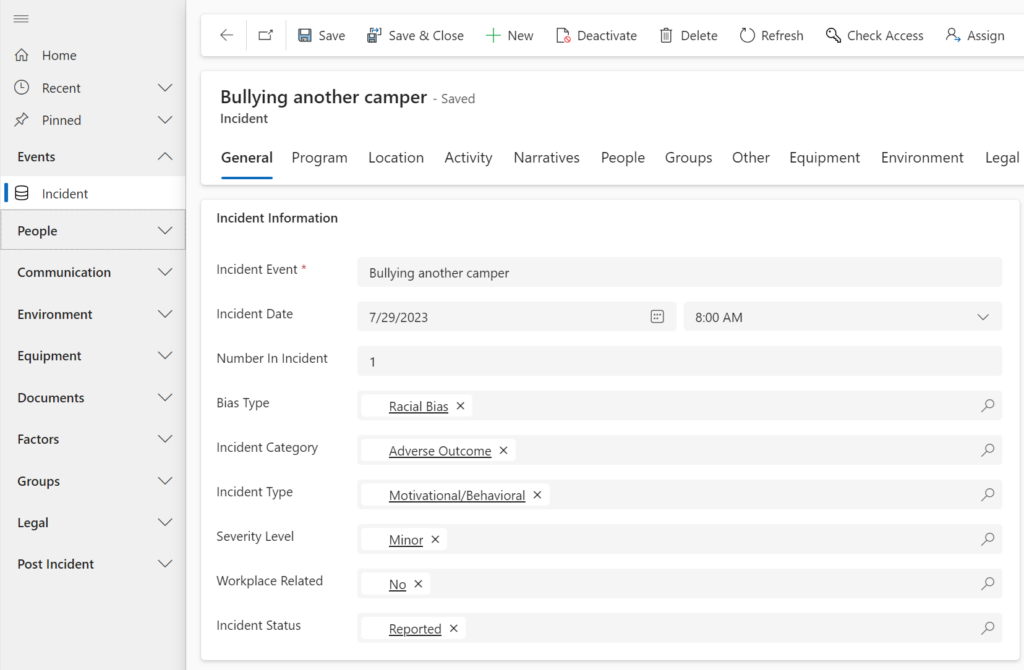
SystemsAnalytix provides the most customizable data storage environment available, thanks to Microsoft Dataverse. Implement role-based access control at the row and even the column level. Mask sensitive data and build your own custom forms with role-based user access. You can even add new data columns and entire new tables, all from the Power Apps Maker Portal. It is your app that grows as your needs grow.

Drill Down into your Data

The hierarchical data structure of SystemsAnalytix apps and custom forms and views allows you to capture detailed data and drill down in to see an incredible level of detail. 

Incident Detail - General
IncidentAnalytix Power BI Dashboard

Powerful Data Analytics

  • Real-time integrated data analytics from Microsoft Power BI allow you to drill down into your data giving you actionable insights on your data. 
  • Use the advanced AI capabilities of Microsoft CoPilot to easily explore your data. 
  • Empower your organization to identify critical trends by giving your staff the ability to drill down and explore your data.

Microsoft Teams App &
Mobile Apps

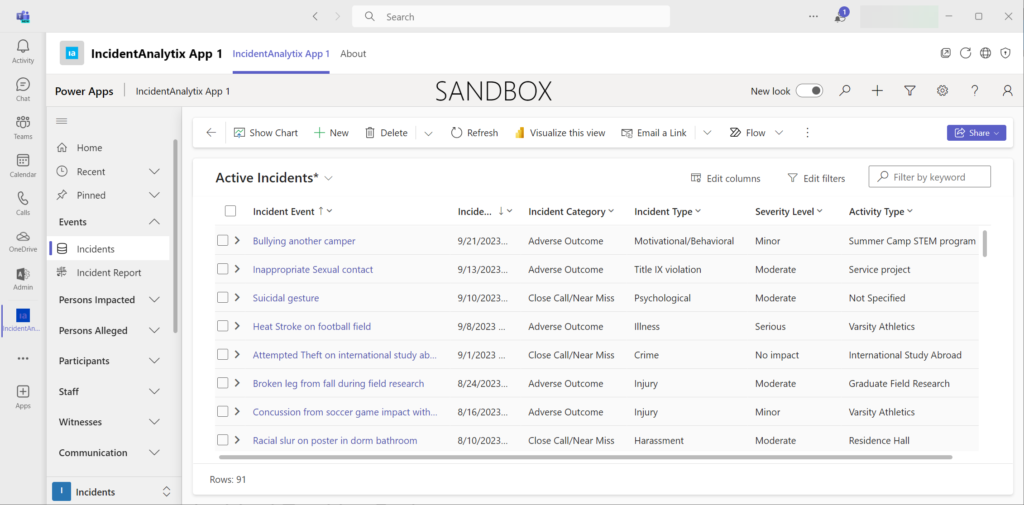
SystemsAnalytix apps also can be installed within Microsoft Teams to integrate with your daily workflow. Share information on Teams with colleagues and stay on top of risk management.

Power Apps Mobile is an app player available on IOS, Android and Windows that lets you take SystemsAnalytix apps anywhere. Offline mobile access lets staff capture import incident data anytime, anywhere.

Microsoft Teams